Tutorials / Building questionnaires
Building questionnaires
Compose the question set you send to vendors — data questions, document requests, and a publish step that locks it in.
- 1
Create a questionnaire
In Questionnaires, name a new questionnaire — say “Annual vendor questionnaire” — and open it. It starts as a Draft, which means you can shape it freely.
- 2
Add questions
Use Add question for each thing you need to know. Pick a type — short or long text, yes/no, date, single or multi select (with your own options) — add optional help text, and tick Required for anything the vendor must answer. Reorder with the arrows any time while drafting.
- 3
Request a document
To collect a file rather than an answer, use the dedicated Request a documentcontrol below the question form. Describe what you need — “Certificate of insurance” — and the vendor will see an upload slot for a PDF, image, DOCX, or XLSX up to 25 MB.
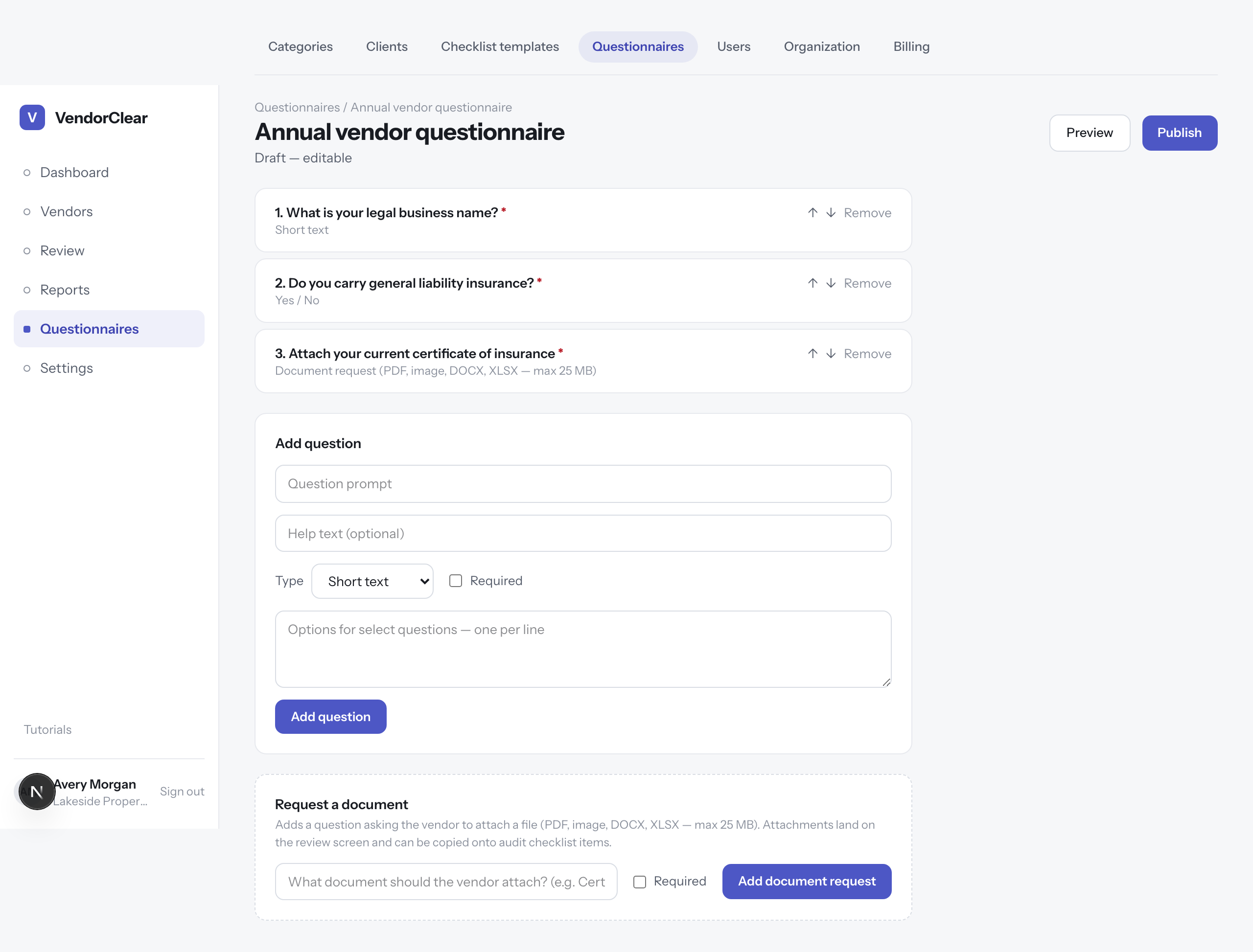
The builder — questions in order, the add-question form, and the dedicated document-request control. - 4
Preview, then publish
Previewshows the form exactly as the vendor will see it. When it's right, Publish. Published questionnaires can be sent to any number of vendors.
Good to know · Publishing locks editing, and every send snapshots the questions — so a submission always matches what the vendor was actually asked, even if you build a new version later.
